Today we released some howtos for POI 4 XPAGES on my.webgate.biz/poi.documentation.
Thanks Lena for sharing this with us.
Today we released some howtos for POI 4 XPAGES on my.webgate.biz/poi.documentation.
Thanks Lena for sharing this with us.
Hi All
Only a few hours and I will travel with Roman, Peter and Andre to the IBMConnect2013. The last years “LotusSphere 2012” (the old name of the IBMConnect) was a game changer in my life. I meet great people like Niklas Heidloff, Philippe Riand, Martin Donnelly, Dan O’Conner and many more.
But these guys have inspired me to build myWebGate and POI 4 XPages.
We have greate news about both projects, but this post ist about POI 4 XPages. We have made some progresses on the project that we would like to share in the version 1.1.0:
POI 4 XPages build your Workbook or Document with the “generate….” function. But when the action is started, you don’t have access to the Workbook or Document object. “postGenerationProcess” change this. In the postGenerationProcess your SSJS / Java Code will be executed, right before the Workbook or Document is transmitted from the server to the client.
The follwowing code in the postGenerationProcess prints the name of the first sheet on a workbook to the server console:
print( workbook.getSheetAt(0).getSheetName() );
While we are calling the postGenerationProcess, the POI 4 XPages Code assign the current workbook to the variable workbook, or the current document to the variable xwpfdocument. This variable are representation of the the following apache poi classes:
workbook: org.apache.poi.ss.usermodell.Workbook -> javadoc
xwpfdocument: org.apache.poi.xwpf.usermodell.XWPFDocument -> javadoc
Imagine what you can do now, afert a document or a workbook is created!
Have Fun
Christian
Download POI4XPages here
Our scenario:
You have built a beautiful web application where you list all your contacts on a page. Although the contacts can be accessed online some users request an export to excel:

To fullfill this request do the following steps:
Let’s begin with some coding:
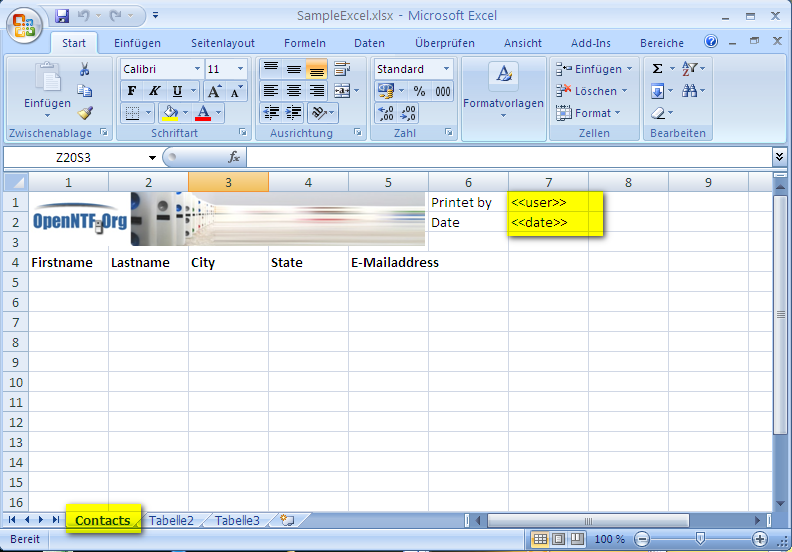
We have highlighted several things on the screenshot.
Our export view looks like this. Keep the column titles in mind, as we are going to use them for the column definition of our export:

Save your Excel template and insert it as a FileResource to the appliction
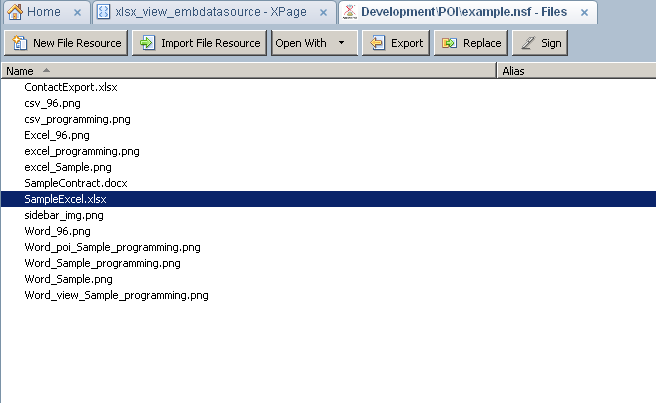
Add the ‘Poi Workbook’ control to the Page

Select the POI Workbook control and switch to the properties panel. It’s time to configure the export.

Add a templateSource to the element. The template source defines which excel file will be used. You can choose between “resourcetemplate” (a resourcefile) or “attachmenttemplate” (a attachment in a document from a defined database).
In this example we use ‘resourcetemplate’

As a next step we define the spreadsheet. The spreadsheet represents a sheet in a workbook:

It’s time to define some cellValues. Remember the <<user>> and <<date>> values on the sheet. We will now set the values for these fields:

With the definition of the cellBookmark all the <<user>> and <<date>> tags on the spreadsheet (not within the whole workbook) will be replaced with the specified values during the export.
Be aware that you have to write ‘user’ instead of ‘<<user>>’ for the cellBookmark name.
So, the configuration of the excel file is done and we can now proceed to export our view. Therefore we define an ‘exportDefinition’

We can choose between data2rowexport and data2columnexport which represents the export direction.
Assign the dataSource:

Assign the columns:

Each column needs a columnDefinition.

Choose “Generate Workbook” and select the ID of workbook definition.
Test it and have fun!
Yesterday I received an email from our IP Manager Peter Tanner, which confirmed that POI 4 XPages is ready for the openNTF apache 2 licence catalog.
A simple message I was very excited about. Why, you may think. Here some thougths about this simple mail:
Thanks Peter for your work. Your work is very important.
The apache 2 licences gives us the ability to use and reuse code and make business work.
So use POI 4 XPages in your projects, build applications and bundle POI 4 XPages in your projects. We have tried to make the installation as easy as the extlib can be installed and and we believe that you customers will be excited, when they see your output which you now can generate so easy.
And please give us feedback.
Download POI 4 XPages here
Hello All
Today is my 40th birthday. I think this is a good moment for a little present. Today we release the first version of POI 4 XPages. A powerfull extension for the XPages community. I started developing this project in august 2012 focussed on the 4th DeveloperContest. But as a lucky guy, my boss nominated for the position as one of the OpenNTF Directors and they community voted for me.
The contest changed my role in this project. As a director you are not allowed to contribute projects for the contest. But our plans to release our POI 4 XPages extension where still intact. The pressure form the contest was gone,but some short demonstrations to customers showed us the high value. So some of our team asked: “Why contributing POI 4 XPages – its so powerfull, it’s so handy and it’s such a strong work – Let us sell this piece of work”.
The answer was very simple: You have just given all the reasons, why we should opensource this project!”
So on my 40th birthday I can give the developer community a powerful extension. Generating Word and Excel Files out of XPages was never easier. The groundbreaking work was done by the Apache POI team, our job was to bring this in the XPages Developer Framework.
So I hope that every XPage developer enjoy this.
Download here
Let us begin with building the kernel for the document processing. This kernel is also a part, which we have used as proof of concept. In the previous post (https://guedebyte.wordpress.com/2012/09/07/documents-and-spreadsheets-i/) our focus was on the idea. This entry is about the main processing.
If you want to try this in your own project, please perform the following steps:
Download Eclipse Indigo
Download Apache POI 3.8
The first step is, create a “lib” directory in your project and add the apache-poi libraries to this directory.
Add the libraries to the build-path (without the commons-log and log4j), by selecting the libraries: Left click and select “Build-Path/add to build-path”.
Commons-log and log4j are not needed because the extensible API delivers his own implementation of log4j. If you need a dedicated version of those libraries, it is recommended to encapsulate the code in a separate plugin, which exports only the functionality to the plugin, which extends the api. Both plugins have to be in the same feature (we will come back to this later).
We can now build an interface, witch represents the bookmarks.
package biz.webgate.dominoext.poi.component.data.document;
public interface IDocumentBookmark {
public String getName();
public String getValue();
}
Programming against an interface will definitely safe time. While I was building the prototype of this application for a proof of concept, I had to build my own implementation of IDocumentBookmark, because it was not possible to solve all dependencies of the Xpages Framework. See the difference. The first sample is my prototype implementation, the second one is my library implementation:
1. Prototype implementation
import biz.webgate.dominoext.poi.component.data.document.IDocumentBookmark;
public class BMImplementation implements IDocumentBookmark {
private String m_Name;
private String m_Value;
public BMImplementation(String name, String value) {
super();
m_Name = name;
m_Value = value;
}
@Override
public String getName() {
returnm_Name;
}
@Override
public String getValue() {
return m_Value;
}
}
2. Library implementation:
package biz.webgate.dominoext.poi.component.data.document;
import javax.faces.context.FacesContext;
import javax.faces.el.ValueBinding;
import com.ibm.xsp.complex.ValueBindingObjectImpl;
public class DocumentBookmark extends ValueBindingObjectImpl implements IDocumentBookmark {
private String m_Name;
private String m_Value;
public String getName() {
if (m_Name != null) {
return m_Name;
}
ValueBinding vb = getValueBinding(“name”);
if (vb != null) {
return (String) vb.getValue(getFacesContext());
}
return null;
}
public void setName(String name) {
m_Name = name;
}
public String getValue() {
if (m_Value != null) {
return m_Value;
}
ValueBinding vb = getValueBinding(“value”);
if (vb != null) {
return (String) vb.getValue(getFacesContext());
}
return null;
}
public void setValue(String value) {
m_Value = value;
}
@Override
public void restoreState(FacesContext context, Object value) {
Object[] state = (Object[]) value;
super.restoreState(context, state[0]);
m_Name = (String) state[1];
m_Value = (String) state[2];
}
@Override
public Object saveState(FacesContext context) {
Object[] state = new Object[3];
state[0] = super.saveState(context);
state[1] = m_Name;
state[2] = m_Value;
return state;
}
}
Building a XWPFDocument (from a InputStream)
Replacing all Bookmarks in the document
Writing the XWPFDocument to a ByteArrayBuffer
Here is the code to build a XWPFDocument
public XWPFDocument getDocument(InputStream inDocument) {
try {
XWPFDocument dxReturn = new XWPFDocument(inDocument);
return dxReturn;
} catch (Exception e) {
e.printStackTrace();
}
return null;
}
The bookmark replacement is little bit harder. Let’s begin with the main entry:
publicint processBookmarks2Document(XWPFDocument dxProcess, List<IDocumentBookmark> arrBookmarks) {
// First Prozessing all paragraphs.
for (XWPFParagraph paraCurrent : dxProcess.getParagraphs()) {
processBookmarks2Paragraph(arrBookmarks, paraCurrent);
}
// All Tables
for (XWPFTable tabCurrent : dxProcess.getTables()) {
processBookmarks2Table(arrBookmarks, tabCurrent);
}
// All Headers
for (XWPFHeader headCurrent : dxProcess.getHeaderList()) {
for (XWPFParagraph paraCurrent : headCurrent.getParagraphs()) {
processBookmarks2Paragraph(arrBookmarks, paraCurrent);
}
for (XWPFTable tabCurrent : headCurrent.getTables()) {
processBookmarks2Table(arrBookmarks, tabCurrent);
}
}
// All Footers
for (XWPFFooter footCurrent : dxProcess.getFooterList()) {
for (XWPFParagraph paraCurrent : footCurrent.getParagraphs()) {
processBookmarks2Paragraph(arrBookmarks, paraCurrent);
}
for (XWPFTable tabCurrent : footCurrent.getTables()) {
processBookmarks2Table(arrBookmarks, tabCurrent);
}
}
return 1;
}
First we process all paragraphs in the document, followed by all tables. Then we do the same with the headers and footers. They do also contains tables and paragraphs. So let’s see how we process the paragraphs:
private void processBookmarks2Paragraph( List<IDocumentBookmark> arrBookmarks, XWPFParagraph paraCurrent) {
for (XWPFRun runCurrent : paraCurrent.getRuns()) {
processBookmarks2Run(runCurrent, arrBookmarks);
}
}
Paragraphs contain “Run” elements, which contain a text, that has the same styling and formatting. These run elements are processed in the following function:
public int processBookmarks2Run(XWPFRun runCurrent, List<IDocumentBookmark> arrBookmarks) {
String strText = runCurrent.getText(0);
if (strText != null) {
for (IDocumentBookmark bmCurrent : arrBookmarks) {
String strValue = bmCurrent.getValue();
strValue = strValue == null ? “” : strValue;
if (bmCurrent.getName() != null) {
strText = strText.replaceAll(“<<“ + bmCurrent.getName()+ “>>”, strValue);
}
}
}
runCurrent.setText(strText, 0);
return 1;
}
Our tables also contain paragraphs and run elements. We will also reuse this method. Tables are built on rows and cells, see how we browse that:
private void processBookmarks2Table(List<IDocumentBookmark> arrBookmarks, XWPFTable tabCurrent) {
for (XWPFTableRow tabRow : tabCurrent.getRows()) {
for (XWPFTableCell tabCell : tabRow.getTableCells()) {
for (XWPFParagraph paraCurrent : tabCell.getParagraphs()) {
processBookmarks2Paragraph(arrBookmarks, paraCurrent);
}
}
}
}
That’s all you need for the kernel. The full class will be available with the source code later this year. The next step is to build the UI for the domino designer. Watch out for the next episode.
I’m currently developing the backendservices for our new absenceplanner. We submit all data to a rest service (CustomRestService in the ExtLib). So this service should be able to parse an array of json data. The data has the following format:
{
“dates”:[
{“div”:”dt20120827″,”dt”:”27.08.2012″,”metadata”:{“absenceType”:”Holiday”,”allDay”:true}},
{“div”:”dt20120829″,”dt”:”29.08.2012″,”metadata”:{“absenceType”:”Compensation”,”allDay”:true}}
],
“reqTitle”:”meine wohlverdienten ferien”,
“method”:”request.submit”
}
To parse the stream in to a JsonJavaObject I’ve used:
JsonJavaFactory factory = JsonJavaFactory.instanceEx;
Reader r = request.getReader();
json = (JsonJavaObject) JsonParser.fromJson(factory, r);
String strMethod = json.getString(“method”);
It’s very easy to extract all properties. An object can also be accessed with json.getJsonObject(“name”) . But no arrays. There is no getter.
But, how did others (like the ExtLib programmers) solve this? With this question I’ve read the code of the “twitter parsing” in the sbt of the ExtLib. And I found the solution in the com.ibm.xsp.extlib.sbt.services.client.DataNavigator class, which guides me to the following code:
Object arrDates = factory.getProperty(json, “dates”);
for (Iterator<Object> itDate = factory.iterateArrayValues(arrDates); itDate.hasNext();) {JsonJavaObject jsDate = (JsonJavaObject)itDate.next();
//-> here do all the funny stuff with the jsDate object.
}
Thanks to Philippe Riand (IBM) for sharing your code. Its so inspiring to read your code.
In several projects we are faced with the request to export data to a spreadsheet (mostly excel) or build a document for ms-word. So our development team requested the following: “Build an extension that helps us generate word documents or export datasets to spreadsheets”.
After some research, I found a project called Apache POI.
Apache POI covers all the stories, which we try to implement. So let’s begin with the first story: “Generating a new ms-word document”.
The story is very simple, but also very powerful. In our example the starting point is a document like the OpenNTF Contributor License Agreement. This document is needed for a company to contribute code to OpenNTF. Typically, this document has some lines (fields), which you have to fill in with your values. Let’s try to automate this process. We will build a form in the XPages application, where you can fill in your company name, address and other things. Then we modify the standard OpenNTF form a little bit, as you can see on the screenshot below:

In your XPages form we implement the new POI Document element and then we do some wiring:
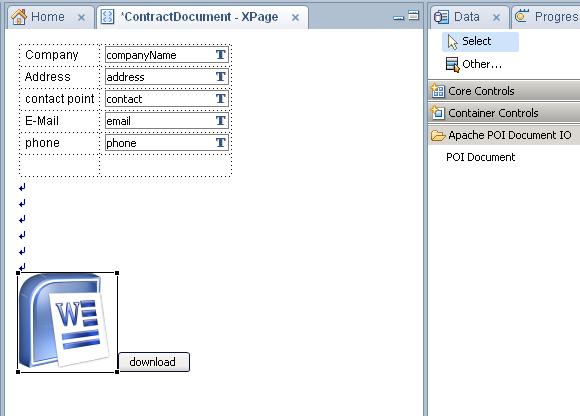


The user can now fill in their values on the page and generate a customized word document. Developers are able to build in applications to produce customized documents in a very short time.
In the next blog entries, we will show you how we have build an extension of this function.
During the lotussphere 2012 I was inspired to build our myWebGate Framework totaly new from scratch. The powere and the energy of the ibm developers and system architects has forced me to rethink my mindset about the whole XPages technologie. But rewriting a one year old framwork, with over a hunder days of manpower investigated, to have the same new made?
A crule idea but our executive board gave us the order to do this, under the focus of training, learning and transforming our development approach. It was a great time.
Yesterday we released the version 1.1 of myWebGate. This version completes some open user stories (see the release notes here) and it also completes a very new way of working together.
Our whole myWebGate development team was at the project start something we called consulting ninijas. High skilled and very talented in any aspect of development and administration of lotus notes domino. At the project start my co-pilot Peter Luder and I decide to change the model. Not a typical vertical approach: We transformed the team to a horizontal development approach. Richard became the role of our UI Guru, Peter does the project controlling and my job was the architecture. Barbara, Arthur and Marco are focused on serveral businessprocesses in the myWebGate Framwork.
This leads us to a better teamplay. Interaction was mandatory and every piece of code we build must fit. This pressure and this model of work, has effected any discussion. Normally you would expect more inefficiency, but it was vice versa. Focussing of the core competence and the delivering of brilliant work, leads to an unexpected effort and more features in the initial release as planned. And also a lot more in release 1.1.
Learn more about myWebGate -> Read This (german) and the documentation (english).
Hello Java and XPages Fans
During our work for the myWebGate 2.0 OpenNTF Edition i was faced with a very simple Problem. I had to access a public method in one of our managed beans. This managed beans are designed to act as session facade. So the bean name is directory bean and the scope is session. The ClassName is based on our internal guidlines DirectorySessionFasade.
In this class, is a method called getMySelf() witch gives me some information about my current user in context of the myWebGate Framework. The powerfull thing about managed beans is, that the object exists only one time baed on the scope, in this case one time each session.
For our activtystream implementation I have to acces this getMySelf() methode, because all my relations are stored in the returning object. A short google search doesnt help, but I rember that I’ve ready a pattern in the ExtensionLibrary, that maby can help. An voilaz there it was, written by Phillip Riand, I found some thing that I changed to this for my situation:
public static final String BEAN_NAME = “directoryBean”; //$NON-NLS-1$
public static DirectorySessionFacade get(FacesContext context) {
DirectorySessionFacade bean = (DirectorySessionFacade)context.getApplication().getVariableResolver().resolveVariable(context, BEAN_NAME);
return bean;
}
public static DirectorySessionFacade get() {
return get(FacesContext.getCurrentInstance());
}
This simple codesnipped gives you the capability to execute DirectorySessionFacade.get().getMySelf(). The DirectorySessionFacade.get() Code calls the get( FacesContext context() and there the inmemory Variable directoryBean can be accessed.
What a simple construct to access the same instance in java as in the SSJS and XPAGES. Thanks to IBM for sharing the ExtensionLibrary as OpenSource.

 guedebyte