RSS

Category Archives: OpenNTF

Off to Boston

It’s a great honor to be invited to the IBM Leadership Alliance Conference at Boston. So I’m a bit nervious. But I’ve some great news to share with other Partners and IBM about OpenNTF and the next big thing.
When I’m back, is a heavy loaded week planed. There are several topics to finish:

  1. Some IP Stuff for the next big thing
  2. Review and update our IBM Cconnections backup concept
  3. find the price plan for our new serivce that we will offer at WebGate and do some planing stuff for the lauch event
  4. And hopefully a lot of coding

As you see a lot of things to cover, so my investigations in a buildserver has to wait until the weekend, but I hope that I can do some tutorials about the webgate ninja style.

PS: Writing blogs with my IPad on the airport is less fun then coding on the airport with my macbook

 
Leave a comment

Posted by on October 22, 2013 in Java, OpenNTF, XPages


Tags:

Yes you can….

Today we will have a webinar about POI4XPages. POI4XPages is plugin that enhance and extend the XPages / XWork platform. It gives you the freedom to produce Word and Excel files direct from a application.

We are getting feedback around the globe for the plugin and it’s amazing to hear that developers use POI4XPages to deliver excellent solutions to their customers. POI4XPages is under the Apache V2 License, that means YES YOU CAN ….

  • use it in any project (see this wiki entry http://en.wikipedia.org/wiki/Apache_License)
  • build a solution or a product and sell this product
  • getting the source code and extend it
  • taking parts of the source code to solve a problem
  • bundle it to a new set of plugins for the XPages / XWork platform

Bundling POI4XPages to a new set of plugins? Sounds like a good idea! Stay tuned we are thinking about some thing real cool @ OpenNTF. I hope that I can blog about it this week.


Tags: ,

POI4XPages Version 1.2.4 is out

We have released the Version 1.2.4 of the popular POI4XPages framework. The new release contains the following new features:

1. Building Tables in Document:

The document control has a new property called tables. If a table is defined, POI4XPages will replace the existing table on the document with this new tabel. See the example how it works -> docx_document_table.xsp

docxTable

2. Execute POI Actions

Since version 1.1.6 is the Apache POI API available to the programmers. But in some situations it’s needed to execute Actions with privileged access. To give you the power of this in your hand, we introduce the AbstractPOIPowerAction.

How it works? See the sample file_upload.xsp and the Java classes.

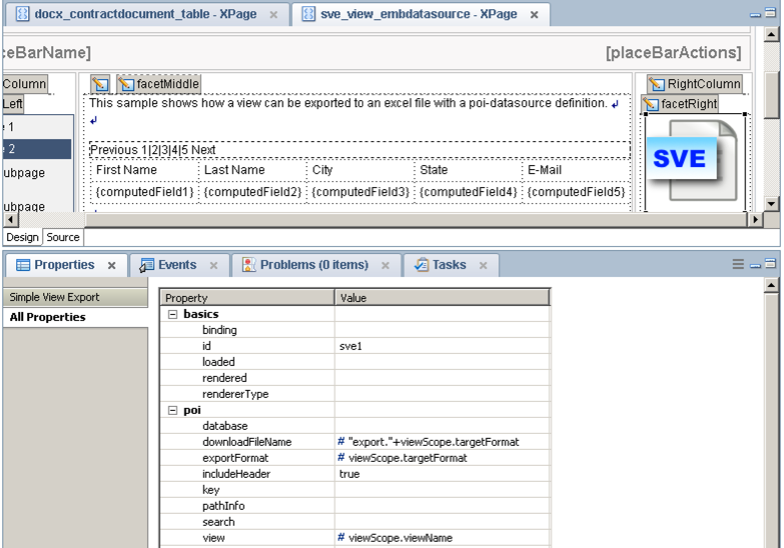
3. Export Views as CSV or Workbook

You have the view designed and need the data as CSV or Workbook? The SimpleViewExport provide this behavior.

sveBlog

Examines the example database. See what you can do with all the controls.

Download the project form OpenNTF.

Visit the install guide and the documentation.

Report bugs and request on GitHub.

And as always… HAVE FUN
Christian


The “ninja-style” programming model by WebGate

First I’ve to excuse that we are so selfish to call our programming model ninja-style. It was happened based on the fact, that we have programmed ninjas in internal programming course. But the term ninja-style was established and if you gave something a name, it’s very hard to change it (Maybe you have seen Monster.Inc by Pixar, then you know what I mean).

Our intention is to make programming for XPages as much fun as possible.  And fun means in the case of programming: Having success, with less of effort and stress.

But the ninja-style has also to do with leaving the comfort zone and go out from this protected workshop in which the most of the domino developers where living. XPages requires a complete new set of skills. On the front end part are you faced with: HTML5, JavaScript, CSS, DOJO (and that’s only the beginning) and of course SSJS for the binding part. On the backend is Java the most required skills, that you should have. But you have also to learn about data sources, controls, data binding and something called JSF life-cycle.

Definitely a lot of topics to cover and the most of us are not geniuses, specially universal genius. It’s a matter of fact that it is easier to split and separate the topics. Because of this we have introduced the N-Tier architecture to our programming model. We have separated the front end stuff, from the back-end stuff.

The front end covers all the presentation (Presentation Layer)

Typically our front end developers are brilliant in arranging all the controls in the XPages and they are mostly virtuous in JavaScript, CSS and Dojo. They know about the “beans” as far as they have to know how to use them as API to the model and the business logic. They don’t care, how object are loaded and stored, they don’t care about how processes and logic are executed, as long all is working correct.

The backend covers all the model and business logic (Business logic Layer)

The back-end guys do all the brilliant stuff with the model of the data and all the processes. Mostly they are Java Cracks or on the way to it. They care about good backend performance and have read the book “design pattern” by the gang of for. No interface and connection to any backend is to complex for them, but do not let them do any HTML stuff.

But where are the storage guys?

At this point, some of the core features of the XPT cames to action. The DSS of the XPT solves all the storage stuff.

But keep this: Having success with XPages has to be about simplification. Our first step was to separate front end from back-end.

To be continued >>>

Christian


Tags: , ,

<xpt:….> – The XPages Tookit – Beta1 released

We have released an early beta of the XPages Toolkit, called beta1 on OpenNTF. A short time before I was going to the hospital for a heart revision task :). But the XPages Toolkit need some explanations about the why and what.

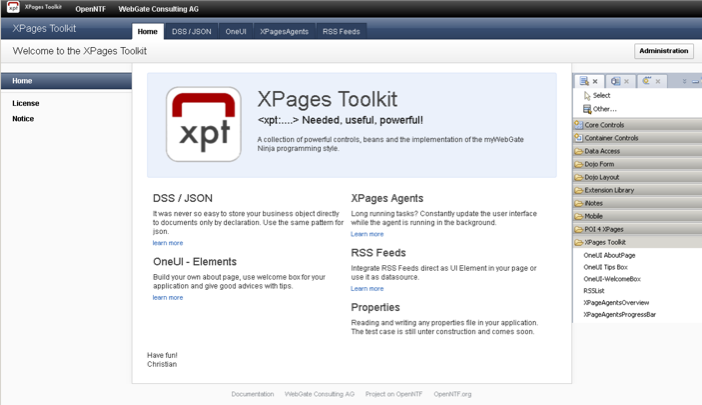
xptStartScreenshot

The XPages Toolkit (in short XPT) is a extendable Extension to the XPages Runtime and the Extension Library. The XPT contains a strong core for a programming model that we have introduced at WebGate as the ninja-style. I will blog later this week about this programming model and I will also make some snippets to this available.

But what contains the XPT:

  • The core (for the ninja-style / hope this name is not protected)
  • RSS Datasource and UIControl -> a ready to use UI-Element so display RSS Feeds
  • Read and write Access to properties files
  • Some missing OneUI Elements (like the aboutbox, the welcomebox and the tipbox)
  • And the XPages Agents with ready to use UI Elements and a replacment for the agents manager

And it is extendable. We have designed the XPT to make it easy to plugin other solutions. I will cover this topic also in a separate blog post. But in short, I think there are some many good things available under apache licence. Or think about the charting in dojox, its one of the things that I miss as a good UI Control. I know that there is a great OpenNTF project available from Julian Buss (YouAtNotes xCharting), but why not integrate the code into a plugin?

All the best
Christian

PS: Heart revision task was successfully completed and I have a good recovery time.

 
1 Comment

Posted by on September 23, 2013 in Architektur, OpenNTF, XPages, XPT


Tags: , ,

Chairman of OpenNTF

I woke up this morning an my first question was. Is it true? Really? Then I hand over to twitter and my mail account… Yes it’s true. I was yesterday nominated and elected as the new chairman of OpenNTF. A dream has become true.

OpenNTF is one of the most vibrant open source community. It’s a global, multinational and multicultural community with members in nearly each timezone of the world. My first year at the board of OpenNTF was incredible and I was surprised what a strong impact OpenNTF has.

Over a decade (I’m not quite sure in this fact) has Bruce Elgort OpenNTF developed to this strong community. It’s a great honor to follow his path and working with the directors of the board to make OpenNTF even more successful.

Thanks for all trust and credits.

Christian

Learn more about OpenNTF and the people behind.

 
14 Comments

Posted by on September 20, 2013 in OpenNTF, SocialBusiness


New Documentation for POI 4 XPAGES available

Today we released some howtos for POI 4 XPAGES on my.webgate.biz/poi.documentation.

Thanks Lena for sharing this with us.


Tags: ,

Documents and Spreadsheets with XPages – building the kernel (Part II)

Let us begin with building the kernel for the document processing. This kernel is also a part, which we have used as proof of concept. In the previous post (https://guedebyte.wordpress.com/2012/09/07/documents-and-spreadsheets-i/) our focus was on the idea. This entry is about the main processing.

If you want to try this in your own project, please perform the following steps:

  1. Download Eclipse Indigo

  2. Download Apache POI 3.8

  3. Prepare a project based on the following instructions of René Winkelmeyer: http://de.slideshare.net/muenzpraeger/uklug-2012-xpages-extensibility-api-going-deep (starts at page 23)

The first step is, create a “lib” directory in your project and add the apache-poi libraries to this directory.
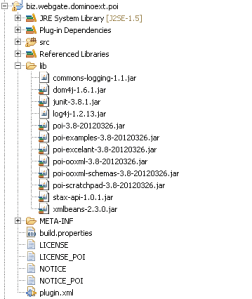
Add the libraries to the build-path (without the commons-log and log4j), by selecting the libraries: Left click and select “Build-Path/add to build-path”.

Commons-log and log4j are not needed because the extensible API delivers his own implementation of log4j. If you need a dedicated version of those libraries, it is recommended to encapsulate the code in a separate plugin, which exports only the functionality to the plugin, which extends the api. Both plugins have to be in the same feature (we will come back to this later).

We can now build an interface, witch represents the bookmarks.

package biz.webgate.dominoext.poi.component.data.document;

public interface IDocumentBookmark {

    public String getName();

    public String getValue();

}

Programming against an interface will definitely safe time. While I was building the prototype of this application for a proof of concept, I had to build my own implementation of IDocumentBookmark, because it was not possible to solve all dependencies of the Xpages Framework. See the difference. The first sample is my prototype implementation, the second one is my library implementation:

1. Prototype implementation

import biz.webgate.dominoext.poi.component.data.document.IDocumentBookmark;

public class BMImplementation implements IDocumentBookmark {

private String m_Name;
private String m_Value;

public BMImplementation(String name, String value) {

super();
m_Name = name;
m_Value = value;

}

@Override

public String getName() {

returnm_Name;

}

@Override

public String getValue() {

return m_Value;

}

}

2. Library implementation:

package biz.webgate.dominoext.poi.component.data.document;

import javax.faces.context.FacesContext;
import javax.faces.el.ValueBinding;
import com.ibm.xsp.complex.ValueBindingObjectImpl;

public class DocumentBookmark extends ValueBindingObjectImpl implements IDocumentBookmark {

private String m_Name;
private String m_Value;

public String getName() {

if (m_Name != null) {

return m_Name;

}

ValueBinding vb = getValueBinding(“name”);

if (vb != null) {

return (String) vb.getValue(getFacesContext());

}

return null;

}

public void setName(String name) {

m_Name = name;

}

public String getValue() {

if (m_Value != null) {

return m_Value;

}

ValueBinding vb = getValueBinding(“value”);

if (vb != null) {

return (String) vb.getValue(getFacesContext());

}

return null;

}

public void setValue(String value) {

m_Value = value;

}

@Override

public void restoreState(FacesContext context, Object value) {

Object[] state = (Object[]) value;
super.restoreState(context, state[0]);
m_Name = (String) state[1];
m_Value = (String) state[2];

}

@Override

public Object saveState(FacesContext context) {

Object[] state = new Object[3];
state[0] = super.saveState(context);
state[1] = m_Name;
state[2] = m_Value;
return state;

}

}

Now let’s build the kernel. We do a simple 3 step approach.

  1. Building a XWPFDocument (from a InputStream)

  2. Replacing all Bookmarks in the document

  3. Writing the XWPFDocument to a ByteArrayBuffer

Here is the code to build a XWPFDocument

public XWPFDocument getDocument(InputStream inDocument) {

try {

XWPFDocument dxReturn = new XWPFDocument(inDocument);
return dxReturn;

} catch (Exception e) {

e.printStackTrace();

}
return null;

}

The bookmark replacement is little bit harder. Let’s begin with the main entry:

publicint processBookmarks2Document(XWPFDocument dxProcess, List<IDocumentBookmark> arrBookmarks) {

// First Prozessing all paragraphs.

for (XWPFParagraph paraCurrent : dxProcess.getParagraphs()) {

processBookmarks2Paragraph(arrBookmarks, paraCurrent);

}

// All Tables

for (XWPFTable tabCurrent : dxProcess.getTables()) {

processBookmarks2Table(arrBookmarks, tabCurrent);

}

// All Headers

for (XWPFHeader headCurrent : dxProcess.getHeaderList()) {

for (XWPFParagraph paraCurrent : headCurrent.getParagraphs()) {

processBookmarks2Paragraph(arrBookmarks, paraCurrent);

}

for (XWPFTable tabCurrent : headCurrent.getTables()) {

processBookmarks2Table(arrBookmarks, tabCurrent);

}

}

// All Footers

for (XWPFFooter footCurrent : dxProcess.getFooterList()) {

for (XWPFParagraph paraCurrent : footCurrent.getParagraphs()) {

processBookmarks2Paragraph(arrBookmarks, paraCurrent);

}

for (XWPFTable tabCurrent : footCurrent.getTables()) {

processBookmarks2Table(arrBookmarks, tabCurrent);

}

}

return 1;

}

First we process all paragraphs in the document, followed by all tables. Then we do the same with the headers and footers. They do also contains tables and paragraphs. So let’s see how we process the paragraphs:

private void processBookmarks2Paragraph( List<IDocumentBookmark> arrBookmarks, XWPFParagraph paraCurrent) {

for (XWPFRun runCurrent : paraCurrent.getRuns()) {
processBookmarks2Run(runCurrent, arrBookmarks);
}

}

Paragraphs contain “Run” elements, which contain a text, that has the same styling and formatting. These run elements are processed in the following function:

public int processBookmarks2Run(XWPFRun runCurrent, List<IDocumentBookmark> arrBookmarks) {

String strText = runCurrent.getText(0);

if (strText != null) {

for (IDocumentBookmark bmCurrent : arrBookmarks) {

String strValue = bmCurrent.getValue();
strValue = strValue == null ? “” : strValue;

if (bmCurrent.getName() != null) {

strText = strText.replaceAll(“<<“ + bmCurrent.getName()+ “>>”, strValue);

}

}

}

runCurrent.setText(strText, 0);
return 1;

}

Our tables also contain paragraphs and run elements. We will also reuse this method. Tables are built on rows and cells, see how we browse that:

private void processBookmarks2Table(List<IDocumentBookmark> arrBookmarks, XWPFTable tabCurrent) {

for (XWPFTableRow tabRow : tabCurrent.getRows()) {

for (XWPFTableCell tabCell : tabRow.getTableCells()) {

for (XWPFParagraph paraCurrent : tabCell.getParagraphs()) {

processBookmarks2Paragraph(arrBookmarks, paraCurrent);

}

}

}

}

That’s all you need for the kernel. The full class will be available with the source code later this year. The next step is to build the UI for the domino designer. Watch out for the next episode.

 

Tags: , , , ,

Documents and Spreadsheets with XPages – the Idea (Part I)

In several projects we are faced with the request to export data to a spreadsheet (mostly excel) or build a document for ms-word. So our development team requested the following: “Build an extension that helps us generate word documents or export datasets to spreadsheets”.
After some research, I found a project called Apache POI.

Apache POI covers all the stories, which we try to implement. So let’s begin with the first story: “Generating a new ms-word document”.
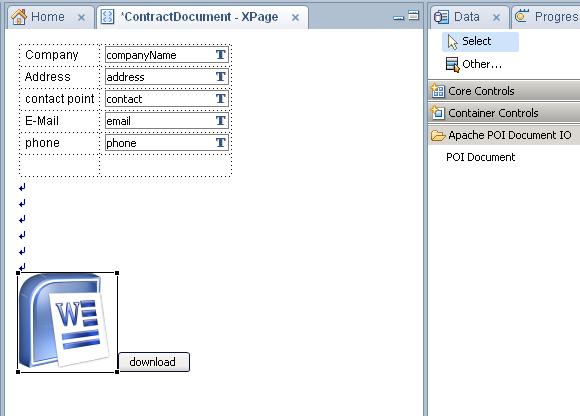
The story is very simple, but also very powerful. In our example the starting point is a document like the OpenNTF Contributor License Agreement. This document is needed for a company to contribute code to OpenNTF. Typically, this document has some lines (fields), which you have to fill in with your values.  Let’s try to automate this process. We will build a form in the XPages application, where you can fill in your company name, address and other things. Then we modify the standard OpenNTF form a little bit, as you can see on the screenshot below:


In your XPages form we implement the new POI Document element and then we do some wiring:

  1. We define where the modified OpenNTF Licence Agreement is. This could be a file resource in the application, or a document accessible via view and a predefined key.
  2. Defining “Bookmarks”:
    As you see on the word document, we have defined several “<<NAME OF BOOKMARK>>” tags in the text. This text must be in the same style, so they are in the same “run” Element on the document.
  3. In our “POI Document” – Control could we now define a bookmark for each <<…>> element, which contains the name and a value.
  4. As you see, the value can be computed (so a binding to a viewScope variable is possible)
  5. We define a “download” button and connect the onClick event on a new action called “Generate Document”

The user can now fill in their values on the page and generate a customized word document.  Developers are able to build in applications to produce customized documents in a very short time.
In the next blog entries, we will show you how we have build an extension of this function.


Tags: , , , ,